
JavaScript Tutorial for Beginners: Complete Guide to JavaScript in 2026
Every website you have ever clicked a button on, filled out a form on, or watched update without reloading the page was running JavaScript. It is the only programming language that runs natively in every web browser on earth, which alone would make it worth learning – and on top of that, it now runs on servers, powers mobile apps, and sits behind a large share of the APIs and AI-powered tools built in 2026.
This tutorial takes you from a blank script tag to real, working JavaScript: variables, functions, arrays and objects, the DOM, asynchronous code, working with real APIs, and where JavaScript fits into Node.js, modern frameworks and test automation. Every concept here comes with actual code you can run, not just a definition to memorize.
If you are deciding between JavaScript and another first language, it is worth knowing there is no wrong choice here – plenty of developers learn both. If you would rather compare the two side by side first, our Python tutorial covers the same ground for Python. This guide assumes no prior experience and builds everything up from scratch.
What Is JavaScript?
JavaScript is a programming language originally built to make web pages interactive – reacting to clicks, updating content without a page reload, validating a form before it submits. It has since grown far beyond the browser, and now runs on servers through Node.js, powers mobile and desktop apps, and sits underneath most modern web frameworks.
JavaScript vs HTML and CSS
These three are often learned together, and they do different jobs. HTML provides the structure of a page – the headings, paragraphs and buttons. CSS controls how that structure looks – colors, spacing, layout. JavaScript controls behavior – what happens when someone clicks, types, or scrolls. A page can exist with just HTML and CSS; it just will not do anything when you interact with it. JavaScript is what makes a page respond.
Why Is JavaScript So Popular?
- It is the only language browsers run natively. No other language gets this by default, which alone guarantees JavaScript a permanent place in web development.
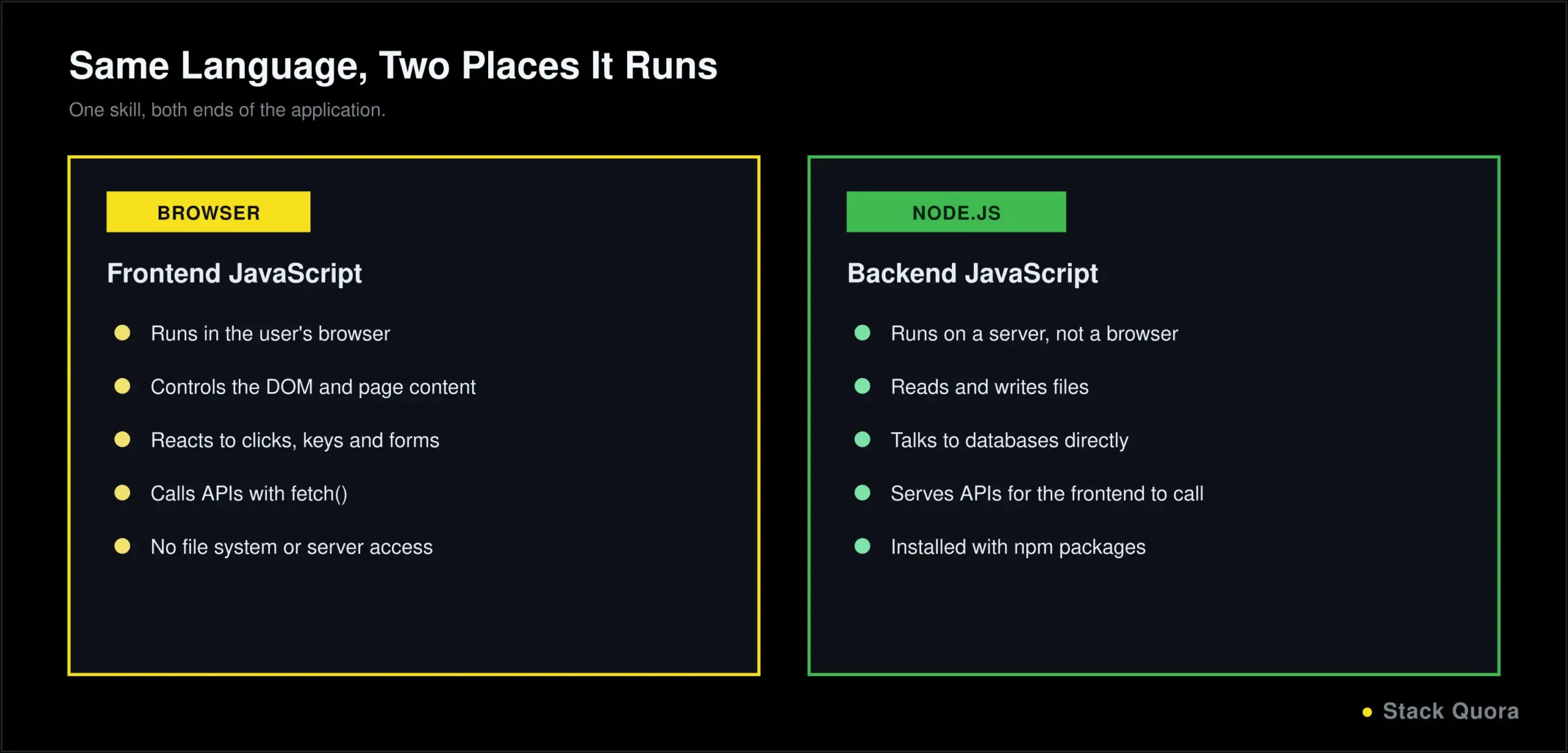
- It works on the frontend and the backend. Node.js lets you write server-side code in the same language as your browser code, so one skill covers both ends of a web application.
- A massive ecosystem. npm, JavaScript’s package manager, hosts the largest collection of open-source packages of any language, covering almost anything you might need to build.
- Constant, active evolution. Modern JavaScript, often called ES6 and later, added features like arrow functions, destructuring and async/await that make the language noticeably nicer to write than it was a decade ago.
Who Should Learn JavaScript?
JavaScript is a reasonable first language for anyone interested in web development specifically, and it is close to mandatory if you want to build anything that runs in a browser, regardless of what other languages you already know. It also shows up constantly in test automation, backend APIs, and increasingly in tooling around AI applications. If your goal is broad, general-purpose programming rather than web-specific work, our Python tutorial is worth comparing against this one before you pick a starting point – both are genuinely good first languages, aimed at slightly different destinations.
Why Learn JavaScript in 2026?
- Modern web development still runs on it. Every interactive website, from a simple contact form to a full web application, depends on JavaScript somewhere in the stack.
- Frontend development is essentially JavaScript. Frameworks change; the language underneath them has not.
- Backend development through Node.js lets teams use one language across their entire stack, which simplifies hiring, code sharing and tooling.
- Modern web applications, the kind that feel like a native app in your browser, are built almost entirely with JavaScript-based frameworks handling routing, state and rendering.
How to Run JavaScript
Running JavaScript in the Browser and DevTools Console
The fastest way to try JavaScript needs no installation at all. Open any web browser, right-click the page, choose “Inspect,” and open the Console tab. Type a line of JavaScript and press Enter:
console.log("Hello from the console!");You will see the output printed immediately. This console is where you will spend a lot of time debugging real projects later, so it is worth getting comfortable with early.
To run JavaScript inside an actual web page, link a script file from your HTML:
<script src="script.js"></script>Running JavaScript With Node.js
To run JavaScript outside a browser entirely, you need Node.js, a JavaScript runtime built for servers and command-line tools. As of 2026, Node.js 24 is the current Active LTS release, with Node.js 22 still supported under maintenance. Download and install it, then check it worked:
node --versionCreate a file named hello.js:
console.log("Hello from Node.js!");Run it from your terminal:
node hello.jsAny code editor works for the examples in this guide; Visual Studio Code, with its excellent built-in JavaScript support, is the common default most beginners land on.
JavaScript Syntax and Basic Concepts
JavaScript statements are instructions the browser or Node.js executes in order, conventionally ending with a semicolon, though JavaScript will often insert missing semicolons for you automatically. Relying on that automatic behavior is a common source of subtle bugs, so most style guides recommend writing semicolons explicitly rather than skipping them.
// This is a comment, ignored when the code runs
let greeting = "Hello, world!";  // a statement
console.log(greeting);            // another statement
Full technical detail on everything in this guide lives in MDN’s JavaScript documentation, widely considered the best reference for the language and worth bookmarking now.
JavaScript Variables: var, let and const
Modern JavaScript gives you three ways to declare a variable, and which one you reach for actually matters:
var oldStyle = "avoid this in modern code";
let count = 0;          // can be reassigned
const name = "Alex";    // cannot be reassigned
var is the original way to declare a variable, and it behaves in ways that surprise beginners: it is function-scoped rather than block-scoped, and it can be redeclared without an error. Modern JavaScript, generally called ES6 and later, introduced let and const specifically to fix these issues, and virtually all current style guides recommend avoiding var entirely in new code.
let declares a variable that can be reassigned later. const declares a variable that cannot be reassigned after its initial value. The accepted modern default is to use const unless you specifically know a value needs to change, then use let. Note that const prevents reassignment, not mutation: a const array or object can still have its contents changed, just not be replaced entirely.
JavaScript Data Types
// Stringlet name = "Alex";
// Number (JavaScript has one number type for both integers and decimals)
let age = 28;
let price = 19.99;
// Boolean
let isActive = true;
// Undefined: a variable declared but not yet assigned a value
let notSet;
console.log(notSet); // undefined
// Null: an intentional "no value"
let selectedItem = null;
// Object: a collection of key-value pairs
let person = { name: "Alex", age: 28 };
// Symbol and BigInt are less common, used for unique identifiers
// and numbers too large for the regular Number type, respectively
let id = Symbol("id");
let hugeNumber = 9007199254740993n;Arrays and objects are technically both of type object in JavaScript, but they are common and important enough to earn their own dedicated sections just ahead.
JavaScript Operators
// Arithmetic10 + 3; // 13
10 - 3; // 7
10 * 3; // 30
10 / 3; // 3.333...
10 % 3; // 1 (remainder)
10 ** 2; // 100 (exponent)
// Assignment
let x = 5;
x += 1; // same as x = x + 1
// Comparison
10 === 10; // true, same value AND same type
10 == "10"; // true, JavaScript converts types first
10 !== 5; // true
// Logical
true && false; // false
true || false; // true
!true; // false
// Ternary: a compact if-else
let status = age >= 18 ? "adult" : "minor";
// Nullish coalescing: fall back only for null or undefined
let displayName = username ?? "Guest";
// Optional chaining: safely access nested properties
let city = user?.address?.city;=== versus == deserves special attention, because it is one of the most common beginner mistakes in this whole language. == compares values after converting types if needed, which produces surprising results like "10" == 10 being true. === compares both value and type, with no conversion, and is what almost every style guide recommends using by default.
Nullish coalescing (??) and optional chaining (?.) are both relatively recent additions to modern JavaScript, and they solve a genuinely common problem: safely reading a value that might not exist without your code crashing or writing a long chain of manual checks.
Conditional Statements in JavaScript
let age = 20;
if (age < 13) {
  console.log("Child");
} else if (age < 20) {
  console.log("Teenager");
} else {
  console.log("Adult");
}

// switch: useful when comparing one value against many options
switch (age) {
  case 13:
    console.log("Just became a teenager");
    break;
  default:
    console.log("Some other age");
}
switch is worth reaching for once an if / else if chain grows past three or four branches checking the same variable; it reads more clearly at that point, and the break keyword after each case matters, since leaving it out causes execution to fall through into the next case.
JavaScript Loops
for, while and do-while
for (let i = 0; i < 5; i++) { console.log(i); // 0, 1, 2, 3, 4
}
let count = 0;
while (count < 5) {
console.log(count);
count++;
}
// do-while runs the body at least once, even if the condition is false
let n = 10;
do {
console.log(n);
} while (n < 5);for…of, for…in, break and continue
const fruits = ["apple", "banana", "cherry"];
for (const fruit of fruits) {
  console.log(fruit);   // loops over the values
}

const person = { name: "Alex", age: 28 };
for (const key in person) {
  console.log(key, person[key]);   // loops over the keys
}
for...of loops over the values of an array or other iterable. for...in loops over the keys of an object. Mixing these two up is a common beginner error, since using for...in on an array technically works but gives you indexes as strings, not the clean value iteration for...of provides.
break exits a loop immediately. continue skips the rest of the current iteration and moves to the next one, exactly as in most other languages.
JavaScript Functions
Creating Functions, Parameters and Return Values
function add(a, b) { return a + b;
}
console.log(add(3, 4)); // 7Arrow Functions, Default Parameters and Callbacks
Arrow functions, introduced in ES6, are a shorter way to write a function, and they handle the this keyword differently in ways that matter once you get into objects and classes:
const add = (a, b) => a + b;

const greet = (name, greeting = "Hello") => `${greeting}, ${name}!`;
console.log(greet("Alex"));           // "Hello, Alex!"
console.log(greet("Alex", "Hi"));     // "Hi, Alex!"
A callback is simply a function passed into another function, to be called later. This pattern shows up constantly in JavaScript, especially around arrays and asynchronous code, both covered next:
function processUser(name, callback) {
  console.log(`Processing ${name}...`);
  callback();
}

processUser("Alex", () => console.log("Done!"));
JavaScript Arrays
const fruits = ["apple", "banana", "cherry"];
fruits[0];                  // "apple"
fruits.push("orange");       // adds to the end
fruits.pop();                 // removes from the end

const numbers = [1, 2, 3, 4, 5];

const doubled = numbers.map(n => n * 2);
// [2, 4, 6, 8, 10]

const evens = numbers.filter(n => n % 2 === 0);
// [2, 4]

const total = numbers.reduce((sum, n) => sum + n, 0);
// 15

numbers.forEach(n => console.log(n));map(), filter() and reduce() are three of the most useful array methods in modern JavaScript, and learning to reach for them instead of a manual for loop is one of the clearest signs of comfort with the language. map() transforms every item into something new. filter() keeps only the items that pass a test. reduce() collapses the whole array down into a single value. forEach() simply runs a function on every item without building a new array.
JavaScript Objects
const person = { name: "Alex",
age: 28,
greet() {
return `Hi, I'm ${this.name}`;
}
};
person.name; // "Alex"
person.age = 29; // updating a property
delete person.age; // removing a property
// Destructuring: pull values out into their own variables
const { name, age } = person;
// Spread syntax: copy or merge objects
const updatedPerson = { ...person, age: 30 };Destructuring and spread syntax are both modern (ES6+) features that beginners underuse at first and end up relying on constantly once they click. Destructuring saves you from writing person.name, person.age on separate lines. Spread syntax makes copying and merging objects (and arrays) a single, readable line instead of a manual loop.
JavaScript Strings and Template Literals
const name = "Alex";
name.toUpperCase();     // "ALEX"
name.toLowerCase();     // "alex"
name.trim();            // removes surrounding whitespace
name.includes("le");    // true
name.slice(0, 2);       // "Al"

// Template literals: insert variables directly into a string
const greeting = `Hello, ${name}! You have ${5} new messages.`;
Template literals, written with backticks instead of quotes, are worth switching to by default. They handle variable insertion and multi-line strings far more cleanly than concatenating strings with +.
Scope and Closures in JavaScript
Scope determines where a variable is accessible from. A variable declared with let or const inside a block, like an if statement or a loop, is only accessible inside that block — this is called block scope. A variable declared outside any function is in the global scope, accessible everywhere, which is exactly why relying on global variables tends to cause bugs as a project grows.
A closure is a function that remembers the variables from the scope it was created in, even after that outer function has finished running. It sounds abstract until you see it work:
function makeCounter() {
  let count = 0;
  return function () {
    count++;
    return count;
  };
}

const counter = makeCounter();
console.log(counter());   // 1
console.log(counter());   // 2
counter keeps its own private count variable alive between calls, even though makeCounter() already finished running. Closures are the mechanism behind a lot of patterns you will meet later, including how React’s useState works under the hood, so this concept is worth genuinely understanding rather than skimming past.
The JavaScript DOM
The DOM, short for Document Object Model, is how JavaScript sees and controls a web page: every element, from the <body> tag down to a single button, becomes an object JavaScript can read and change.
Selecting and Changing HTML Elements
const heading = document.querySelector("h1");heading.textContent = "Updated by JavaScript!";
heading.style.color = "blue";
const items = document.querySelectorAll(".list-item");Creating and Removing Elements
const newItem = document.createElement("li");newItem.textContent = "New item";
document.querySelector("ul").appendChild(newItem);
newItem.remove();querySelector and querySelectorAll use the same syntax as CSS selectors, which makes them intuitive if you already know CSS: .list-item for a class, #header for an ID, h1 for a tag.
JavaScript Events
An event is something happening on the page: a click, a keypress, a form submission. An event listener is code that waits for that event and reacts to it.
const button = document.querySelector("button");

button.addEventListener("click", () => {
  console.log("Button was clicked!");
});

document.addEventListener("keydown", (event) => {
  console.log(`Key pressed: ${event.key}`);
});

document.querySelector("form").addEventListener("submit", (event) => {
  event.preventDefault();   // stop the page from reloading
  console.log("Form submitted");
});
event.preventDefault() is one of the most useful single lines in browser JavaScript, stopping a form’s default reload-the-page behavior so you can handle the submission yourself, typically by validating input or sending it to an API instead. Event bubbling, where an event on a child element also triggers listeners on its parent elements, is the mechanism behind event delegation: attaching one listener to a parent instead of many listeners to each child, which is more efficient for lists that change often.
JavaScript Asynchronous Programming
Callbacks and Promises
JavaScript runs on a single thread, but a lot of what it does, network requests, timers, file access, takes time. Asynchronous JavaScript is how the language handles “start this, but don’t block everything else while waiting.”
The earliest pattern for this was callbacks, which work but get messy once you chain several together, sometimes called “callback hell.” Promises were introduced to fix that:
const promise = new Promise((resolve, reject) => {
  const success = true;
  if (success) {
    resolve("It worked!");
  } else {
    reject("Something went wrong");
  }
});

promise
  .then(result => console.log(result))
  .catch(error => console.log(error));
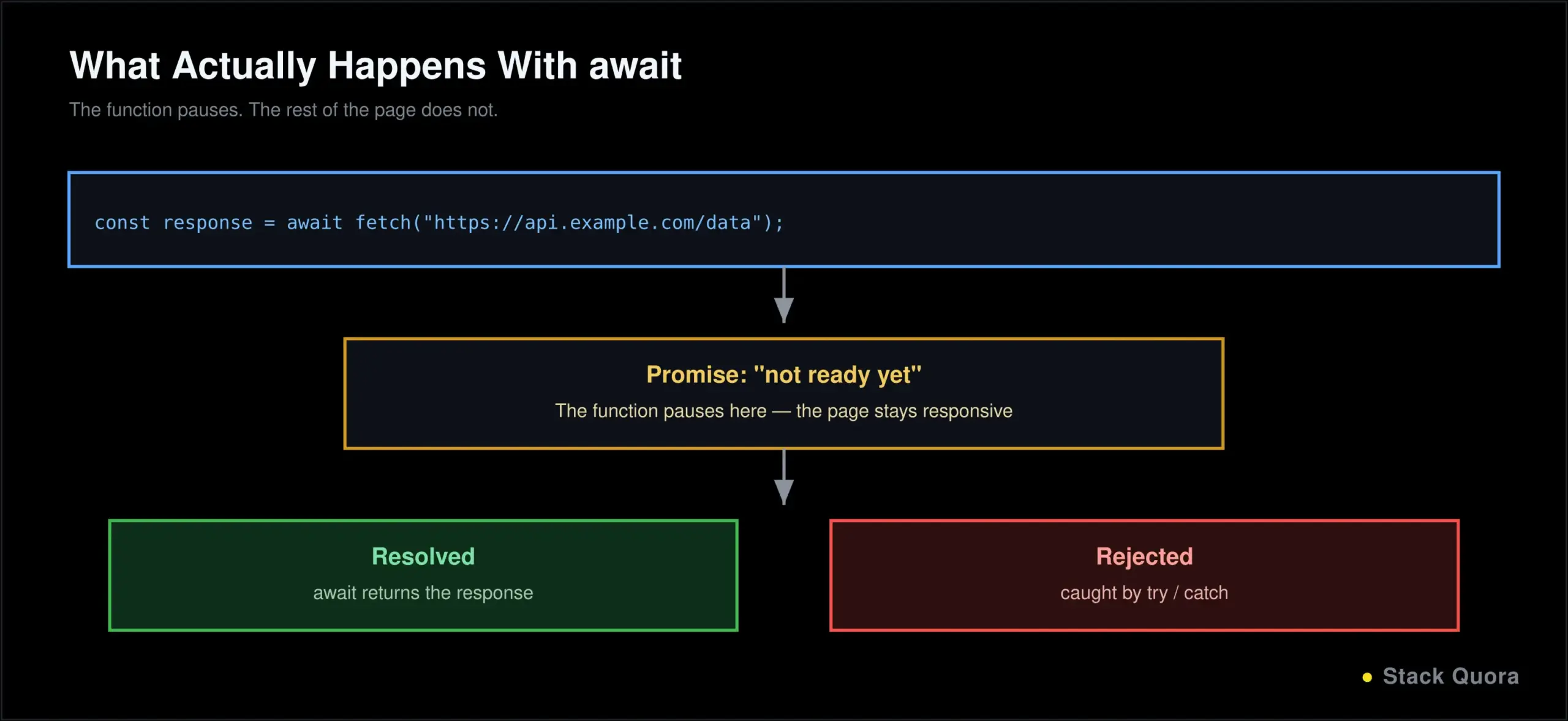
A promise represents a value that is not ready yet, but will be, either successfully (resolve) or with an error (reject).
async and await
async and await, built on top of promises, let you write asynchronous code that reads almost like normal, synchronous code, which is a genuinely large readability improvement:
async function getData() {
  try {
    const response = await fetch("https://api.example.com/data");
    const data = await response.json();
    console.log(data);
  } catch (error) {
    console.log("Error:", error);
  }
}
await pauses execution of the function, without blocking the rest of the page, until the promise resolves. This is the pattern you will use for almost every real API call in modern JavaScript.
The JavaScript Fetch API and Working With JSON
The Fetch API is JavaScript’s built-in way to make HTTP requests, replacing older approaches like XMLHttpRequest in essentially all new code.
// GET request
async function getUser() {
  const response = await fetch("https://api.github.com/users/octocat");
  const data = await response.json();
  console.log(data.name);
}

// POST request with a JSON body
async function createUser(name) {
  const response = await fetch("https://api.example.com/users", {
    method: "POST",
    headers: { "Content-Type": "application/json" },
    body: JSON.stringify({ name: name })
  });

  if (!response.ok) {
    throw new Error(`Request failed: ${response.status}`);
  }

  return response.json();
}
JSON.stringify() converts a JavaScript object into a JSON string to send in a request body. JSON.parse(), or response.json() as shown above, does the reverse, converting a JSON string back into a usable JavaScript object. Checking response.ok before trusting the result matters: fetch does not automatically treat a 404 or 500 status as an error the way you might expect, so skipping that check is a common source of silent bugs. Once you have a real request like this working, testing that endpoint with Postman separately from your frontend code is a genuinely useful habit, since it tells you clearly whether a problem lives in the API or in your JavaScript.
Error Handling in JavaScript
try { const result = JSON.parse("this is not valid JSON");
} catch (error) {
console.log("Something went wrong:", error.message);
} finally {
console.log("This always runs");
}
// Raising your own error
function withdraw(balance, amount) {
if (amount > balance) {
throw new Error("Insufficient funds");
}
return balance - amount;
}
// A custom error type
class InsufficientFundsError extends Error {
constructor(message) {
super(message);
this.name = "InsufficientFundsError";
}
}try holds code that might fail. catch handles the error if one occurs. finally runs regardless, whether there was an error or not, making it the right place for cleanup work. throw lets you raise your own errors, and extending JavaScript’s built-in Error class, as shown above, is the standard way to create a custom, more descriptive error type.
Object-Oriented Programming in JavaScript
class Animal { constructor(name) {
this.name = name;
}
speak() {
return `${this.name} makes a sound`;
}
}
class Cat extends Animal {
speak() {
return `${this.name} says meow`;
}
}
const myCat = new Cat("Whiskers");
console.log(myCat.speak()); // "Whiskers says meow"class and extends are the modern syntax for object-oriented JavaScript, added in ES6. Underneath, JavaScript still uses prototype-based inheritance rather than the classical inheritance model languages like Java use, but the class syntax makes it read the same way most other object-oriented languages do, which is exactly why it is now the standard way to write OOP JavaScript.
Cat extending Animal and overriding speak() demonstrates both inheritance (reusing Animal‘s structure) and polymorphism (the same method name producing different behavior depending on the actual object). Encapsulation, bundling data and behavior together inside a class, is what the class itself already gives you here, and can be tightened further with private class fields, marked with a # prefix, for data that should never be accessed from outside the class.
JavaScript Modules
Modules let you split code across multiple files and import only what you need, rather than writing everything in one giant script.
// math.js
export function add(a, b) {
  return a + b;
}

// app.js
import { add } from "./math.js";
console.log(add(2, 3));
This is the modern ES Modules syntax (export / import), the standard in current browser and frontend code. Node.js historically used a different system, CommonJS (module.exports and require()), and you will still see it in plenty of existing backend code, but ES Modules are increasingly the default there too.
JavaScript and Node.js
Node.js is what took JavaScript from “a language for browsers” to “a genuinely general-purpose language.” It is a JavaScript runtime that runs outside the browser, most commonly on a server.
- JavaScript on the backend means Node.js can handle everything a traditional backend language would: reading and writing files, talking to a database, serving web pages, running a full API.
- npm, Node’s package manager, gives you access to the largest package ecosystem of any programming language, installed with a single command:
npm install package-name. Full details live in the official npm documentation. - Building APIs with Node.js typically uses a framework like Express on top of Node’s built-in HTTP handling, to route requests and send responses cleanly. This is also exactly the layer where a Node backend would talk to something like a database, or, for an AI-powered application, querying a vector database to retrieve relevant content before generating a response.
JavaScript Frameworks and Libraries
Frameworks exist because raw JavaScript, while capable of anything, requires a lot of repeated structural work for a real application: routing, state management, rendering efficiently as data changes. A few dominate the landscape in 2026:
- React remains the most widely used frontend library by a wide margin, backed by Meta, with the largest ecosystem and job market of any option here. It is a library rather than a full framework on its own, which is largely why Next.js has become the default way most new React projects actually get built.
- Next.js, built on top of React, adds routing, server-side rendering and a full production toolchain out of the box. It has become the default starting point for the large majority of new React projects, rather than assembling React’s pieces manually.
- Angular is a complete, opinionated application platform, not just a UI library, with routing, forms and dependency injection built in from the start. It remains particularly strong in larger enterprise codebases that value a consistent, prescribed structure across teams.
- Vue.js sits between React’s flexibility and Angular’s structure, with a gentler learning curve that many beginners find easier to pick up first, and a smaller but genuinely stable and global user base.
A lot of the code these frameworks now produce is not typed by hand at all. If you are vibe coding a frontend – describing a screen or feature in plain language and letting an AI tool generate it – there is a very high chance what comes back is React or Next.js code, since that is what most AI coding tools default to.
When should you use a framework at all? For a simple static page or a small script, plain JavaScript is often genuinely enough, and reaching for a framework adds complexity you don’t need yet. Once an application has meaningfully complex, changing state across multiple views, a framework starts paying for itself quickly.
JavaScript for Test Automation
JavaScript is one of the two or three most common languages for automated testing, largely because it lets teams test a web application in the same language the application itself is written in.
- JavaScript with Playwright is a common, modern choice for end-to-end browser testing, controlling a real browser to click, type and verify what a user would actually see.
- JavaScript with Cypress offers a similar goal with a different developer experience, particularly popular for its live, interactive test runner.
- JavaScript vs Java for test automation mostly comes down to what your application is written in and what your team already knows; JavaScript has an edge specifically for testing JavaScript-heavy frontends, since you are working in one language rather than context-switching.
Test automation has moved fast in the last couple of years, well past fixed scripts alone. Playwright MCP for AI-driven testing and how AI agents are changing QA both cover where this is headed: agents that can plan and run a test session, not only execute a script someone wrote line by line in advance.
JavaScript Projects for Beginners
- Calculator – practice functions, operators and reading user input from the DOM.
- To-do list – practice arrays, the DOM and event listeners working together.
- Weather application – practice the Fetch API by pulling real data from a public weather API.
- Form validation application – practice events, conditionals and giving the user real-time feedback.
- API-based web application – combine the Fetch API, DOM manipulation and error handling into one complete, realistic project.
Build each one without copying a finished solution first. Get stuck, read the actual error message, and only look up an approach once you have genuinely tried to solve it yourself.
Common JavaScript Mistakes Beginners Make
- Confusing
==and===.==converts types before comparing, which produces results that surprise almost everyone at least once; default to===. - Misunderstanding scope. Not realizing a variable declared inside a block or function is not accessible outside it leads to confusing “undefined” errors.
- Ignoring asynchronous code. Forgetting to
awaita promise, or not handling a rejected one, is one of the most common sources of bugs that only show up intermittently. - Mutating objects and arrays incorrectly. Directly modifying an object or array that other code still holds a reference to causes bugs that are genuinely hard to trace; copying with spread syntax first is often the safer move.
- Not handling errors. Skipping
try/catcharound asynchronous code, or ignoring a failed fetch’s status code, means failures happen silently instead of being caught and handled.
JavaScript Best Practices
- Write readable code. Code gets read far more often than it gets written; optimize for the next person, including future you.
- Use meaningful variable names.
userCounttells you something.xdoes not. - Prefer
constandlet. Avoidvarin new code entirely; it is a persistent, unnecessary source of scope-related bugs. - Handle errors properly, especially around anything asynchronous, rather than letting a failed request fail silently.
- Use modular code. Split logic into small, focused files and functions rather than one enormous script.
- Test your JavaScript, deliberately, not just by clicking through it once and assuming it works. As a project grows, wiring those tests into an automated CI/CD pipeline means they run on every change automatically, not only when you remember to run them yourself.
JavaScript vs TypeScript
TypeScript is a superset of JavaScript that adds static typing: every valid JavaScript file is already valid TypeScript, and TypeScript adds the ability to define and check types before your code even runs.
// TypeScript
function add(a: number, b: number): number {
  return a + b;
}
Adoption has shifted hard toward TypeScript through 2025 and 2026, particularly for anything a team will maintain long-term: most major frameworks and top-tier npm packages now ship with TypeScript types by default, and it has become a common expectation on production teams and job listings alike.
When should you use TypeScript? For a quick script, a small prototype, or while you are still learning JavaScript’s fundamentals, plain JavaScript is genuinely fine and arguably the better place to start. For anything a team will maintain, anything talking to an API with a defined shape, or any codebase you expect to still be working on in six months, TypeScript’s caught-at-compile-time errors and dramatically better editor autocomplete tend to pay for the small extra setup cost quickly.
Can you learn TypeScript after JavaScript? Yes, and that is the standard, recommended path. Learn JavaScript’s fundamentals first, so you actually understand what TypeScript’s type annotations are describing, then add TypeScript on top once the basics feel comfortable – usually a matter of weeks, not months, since you are learning an addition to a language you already know, not a new one from scratch.
How to Learn JavaScript Step by Step
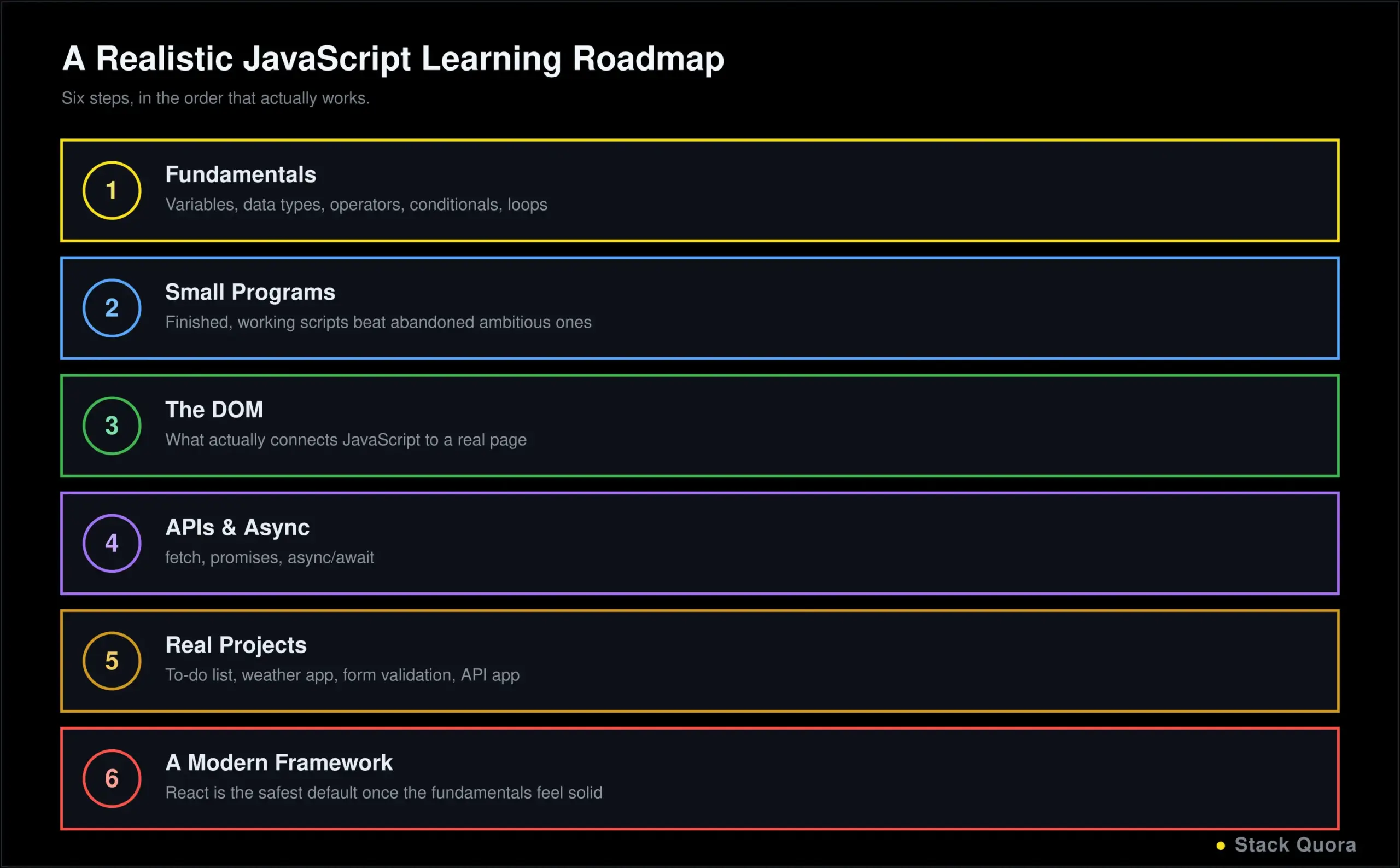
- Learn the fundamentals – variables, data types, operators, conditionals and loops, exactly as covered in this guide.
- Practice with small programs before attempting anything ambitious, the same advice that holds for any language.
- Learn the DOM, since this is what actually connects JavaScript to a real, visible web page.
- Learn APIs and asynchronous JavaScript, since almost every real application needs to talk to a server at some point.
- Build real projects, starting with the beginner list above and growing in scope from there.
- Learn a modern framework, React being the safest default for the widest range of opportunities, once the fundamentals genuinely feel solid.
Final Thoughts
JavaScript’s range is genuinely unusual: the same language that makes a button respond to a click also runs the server behind it, and increasingly, the tooling around the AI features layered on top of both. Learning it well is less about memorizing every method on every object, and more about understanding a smaller set of core ideas, scope, asynchronous code, the DOM, that show up again and again in slightly different forms.
Do not try to absorb this entire guide in one sitting. Work through the fundamentals, actually type the examples, build something small and real, and let the DOM, async and framework sections pull you back in once you have a genuine project that needs them.
The syntax gets comfortable faster than most beginners expect. What takes longer, and matters more, is the habit of building real things regularly. Start with something small today.
Frequently Asked Questions
What is JavaScript?
JavaScript is a programming language that runs natively in every web browser, used to make web pages interactive, and, through Node.js, also used to build servers, APIs and command-line tools outside the browser entirely.
Is JavaScript easy to learn?
The basics are genuinely approachable, especially if you already know some HTML and CSS. Certain concepts, particularly asynchronous code and closures, take longer to feel natural, which is normal and not a sign you are doing something wrong.
Is JavaScript good for beginners?
Yes. You can see results immediately in a browser with zero setup, which makes the early learning curve feel rewarding fast, and the skill applies directly to an enormous share of real-world software.
How long does it take to learn JavaScript?
Basic syntax and fundamentals typically take a few weeks of consistent practice. Comfort with the DOM, asynchronous code and building small real projects usually takes a couple of months. Frameworks and deeper specialization are an ongoing process well past that.
What is JavaScript mainly used for?
Primarily web development, both frontend (making pages interactive) and backend (through Node.js). It is also widely used for browser and API automation, test automation, and increasingly in tooling built around AI applications.
Is JavaScript still worth learning in 2026?
Yes. It remains the only language that runs natively in every browser, and demand for it, directly or through TypeScript, remains consistently high across frontend, backend and test automation roles.
What is the difference between JavaScript and TypeScript?
TypeScript is JavaScript with static typing added on top. Every JavaScript file is valid TypeScript, but TypeScript catches type-related errors before your code runs and gives your editor much richer autocomplete, at the cost of a small amount of extra setup and syntax.
Can JavaScript be used for backend development?
Yes, extensively, through Node.js. Full APIs, real-time applications and complete backend systems are commonly built entirely in JavaScript, letting a team use one language across their whole stack.
Can JavaScript be used for test automation?
Yes. JavaScript is one of the most common languages for browser-based test automation, particularly through tools like Playwright and Cypress, and it has the specific advantage of testing a JavaScript frontend in the same language the frontend itself is written in.
What should I learn after JavaScript?
The DOM and asynchronous programming first, if you have not already, followed by a framework like React to build real, structured applications, and TypeScript once you want the stronger tooling and safety it adds on top of what you already know.